Practice
The reusable transcript control
A reusable React control wraps native capture, server-side Speech, SignalR, storage, and OpenAI so apps can add recording, transcript, and summary.
AI-generated, human-reviewed: the first draft was generated by an AI agent; I fact-checked, tested, and edited it. AI use policy
The button was supposed to travel.
I did not want a meeting app as much as I wanted a reusable piece of one: a capture control I could drop into any application when that app needed voice recording, live transcription, and a summary. The useful thing was not another page with a Start button. It was a building block that could bring its own audio plumbing without asking every host app to learn the exciting hobby of microphone capture.
The other instinct was restraint. A recorder that moves into someone else’s app should not take over the furniture. So the control is collapsible: the everyday tier shows the live journal, the transcript preview, and saved recordings, while quick capture and helper pairing stay folded behind an Advanced tab, the way spare cables belong in a drawer. When a one-click action fails, the Advanced tab opens itself and takes focus, so the fix is one glance away instead of buried.
The rest of the work was making that control small on the outside and serious on the inside.
At a glance
The component had to be a contract
The audio had to become boring
The stream had to earn the upgrade
The cloud stayed behind the API
Why this exists#
An app should not have to become a speech platform just to add capture. I wanted one reusable control with a narrow host contract: bind it to a meeting, point it at the local API, refresh saved recordings after Stop, and optionally render the saved-recordings panel beside it. The helper, streaming, recognition, storage, and summary work can stay behind the control, where the furniture is already bolted to the floor.
- The itch: I kept needing the same capability in more than one place: record voice, show a live transcript, save the artifacts, and produce a summary without rebuilding the audio stack every time.
- Why I built it: As a reusable building block: a drop-in capture component that any app can embed to add voice recording, live transcription, and summarization.
- What you get: A reusable React control pattern, a local helper contract, authenticated WebSocket ingest, SignalR transcript updates, persisted recordings, and backend-only summaries. You also get the seams where this can be tested without publishing the whole app.
- Who this is for: .NET and React builders who need an embeddable capture experience with native audio, live transcript updates, and cloud AI hidden behind a local API.
- Who can skip it: If every app you build already has flawless audio capture, secure speech credentials, replayable recordings, and a summary button, please enjoy whichever alternate timeline issued you that badge.
The rest of the post follows the build from the reusable control contract to the backstage machinery that lets the control behave the same wherever it is embedded.
The plan#
The control is the visible contract. The browser embeds it. The native helper owns local audio capture. The API owns orchestration, cloud calls, persistence, and summaries. That split keeps the host app from becoming a microphone driver, a speech SDK sample, and a storage client wearing one trench coat.
The current embedding point is a meeting detail page. It renders LiveTranscriptControl with four useful seams: meetingSessionId, apiBaseUrl, an onRecordingsChanged callback, and a recordingsSlot for the saved recordings panel. That is the reusable part, and the host never has to know how the Advanced tab folds away.
You will want basic comfort with React components, .NET services, local developer processes, WebSocket-shaped plumbing, and the idea that microphones are real hardware. You do not need to be an audio engineer. Knowing that browsers are impressively enthusiastic about permission prompts is enough.
Here is what the reusable control needs behind it.
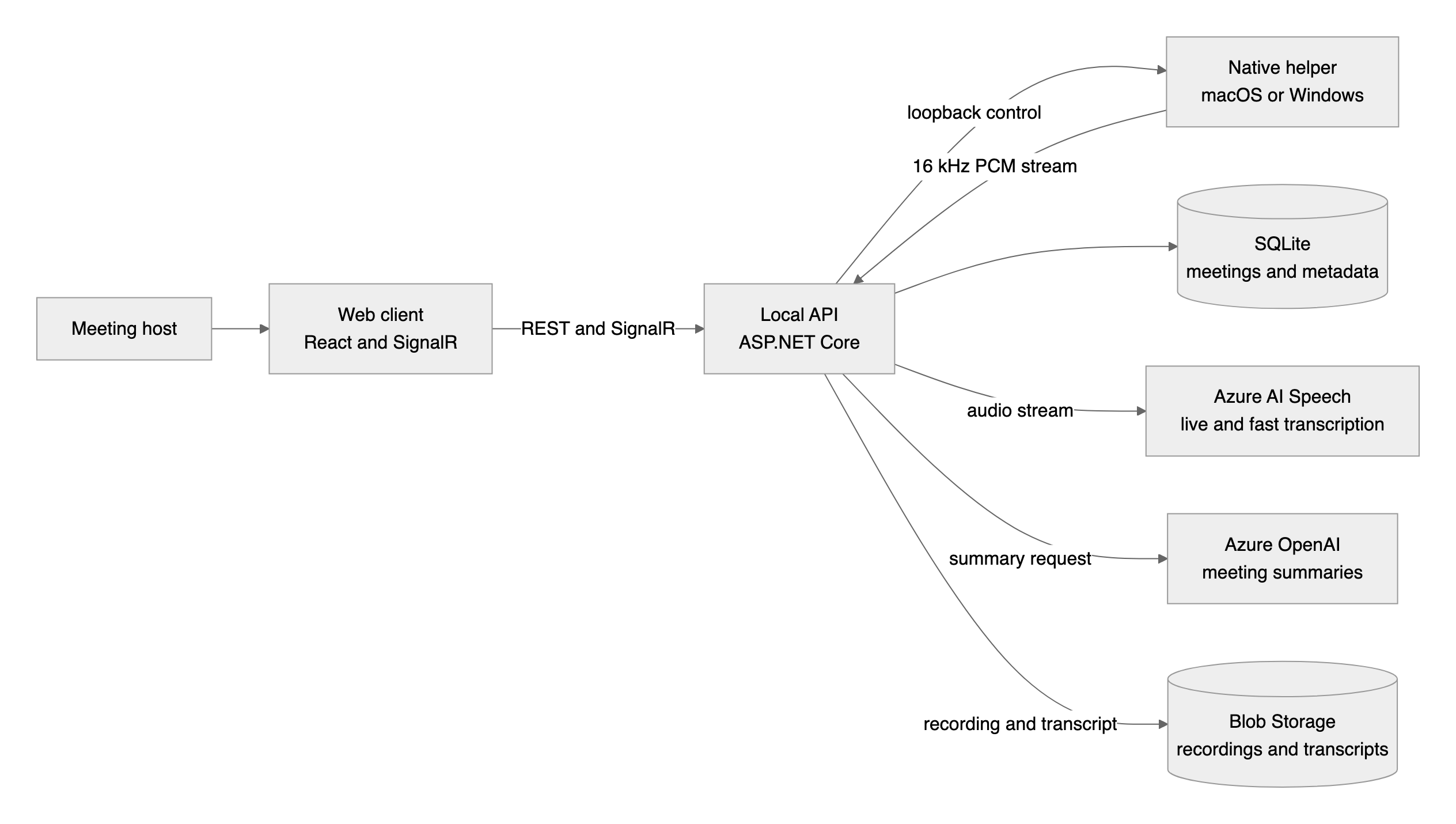
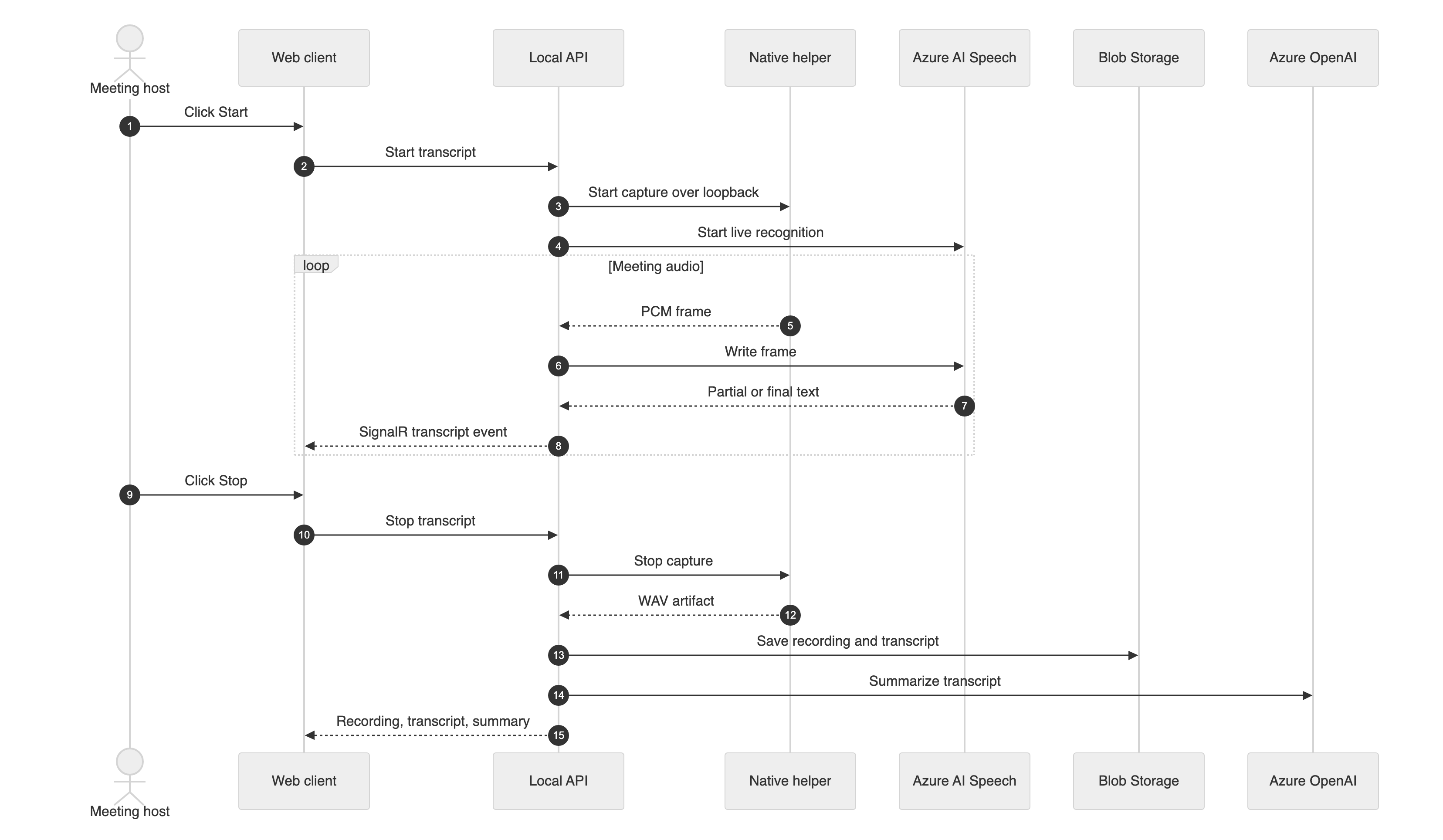
The architecture has three local actors and three Azure services:
- The host page embeds the reusable live transcript control and subscribes to transcript updates through the local API.
- The API tells the native helper to start capture over a loopback contract.
- The helper streams 16 kHz, mono, signed 16-bit PCM frames back to the API.
- The API writes frames into Azure Speech live recognition.
- Final transcript segments flow to the browser over SignalR and are persisted.
- Recordings and transcripts are stored in Blob Storage; summaries come from Azure OpenAI.
1. The component had to be a contract#
The first problem was not audio. It was reuse.
The first problem was not audio.
A one-button interface is easy to draw and easy to over-promise. The source specs already had the ceremony hiding behind the button: restore or create a helper session, confirm capture, start live transcription, stop capture, finalize the transcript, and produce a summary. If every page chained that itself, the “reusable” control would be a decorative wrapper around copied state transitions, which is how bugs get voting rights.
So the component became the app-facing contract. The hosting page supplies the meeting ID, the API base URL, a refresh callback for saved recordings, and the recordings panel slot. Inside, the control composes helper status, live transcript events, transcript preview, the one-click Start/Stop client, and the saved-recordings surface. It exposes the experience as a component, not as a scavenger hunt through helper calls.
The first useful artifact is not the backend. It is the surface area a host app has to live with: one embedded region, one saved-recordings slot, and no invitation for the host page to become an audio subsystem with opinions.
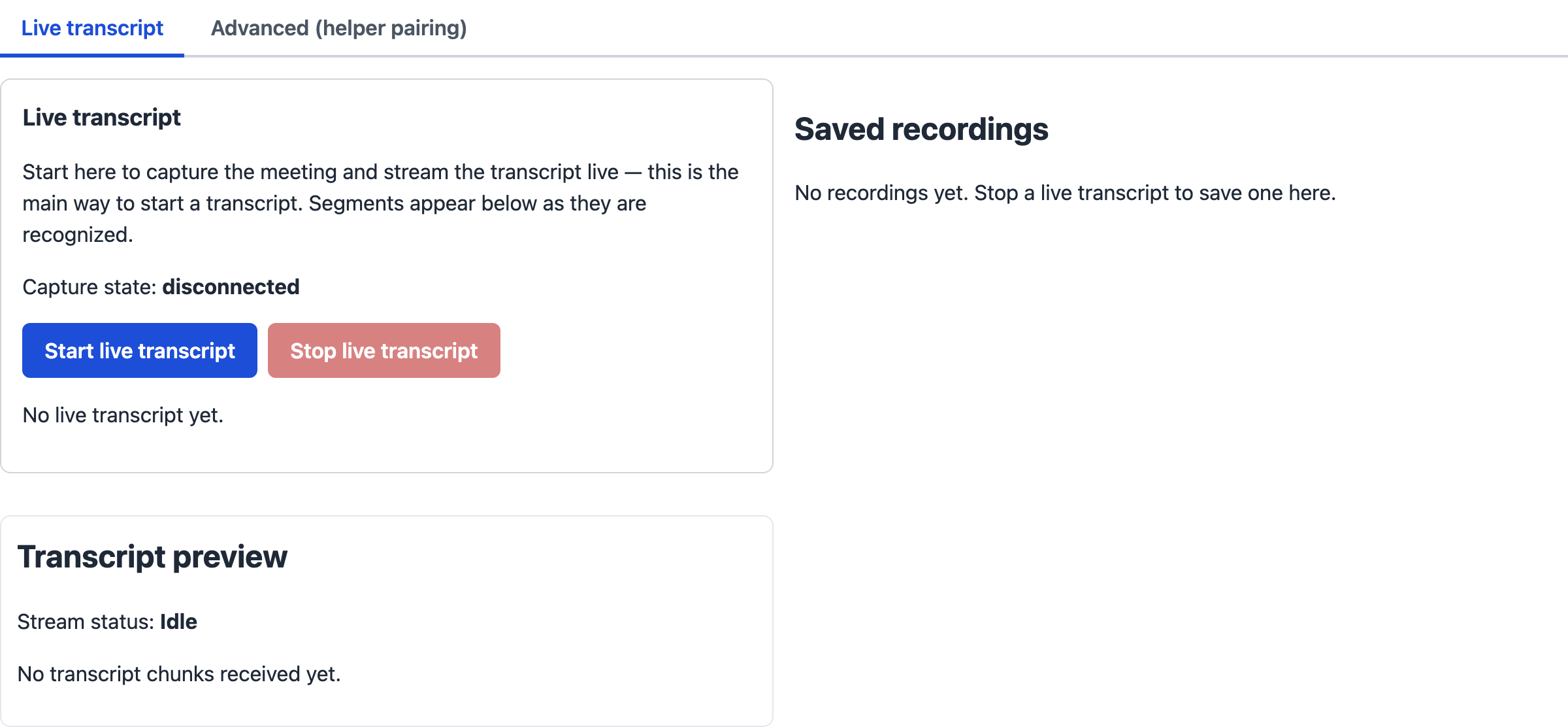
That split also made the helper boundary small enough to trust. The native helper’s local server stays on loopback and implements the same control shape across platforms. The browser never captures audio directly in this design. “No browser microphone” is not the headline; it is the rule that lets the reusable control stay portable without stuffing platform-specific audio into the web layer.
Complete snippet: Host a loopback helper API
2. The audio had to become boring#
The next surprise was format, because audio likes to arrive dressed for a different party.
The next surprise was format, because audio likes to arrive dressed for a different party.
On Windows, WASAPI capture is commonly 48 kHz float stereo. Azure Speech live recognition is happier with a plain stream: PCM signed 16-bit, mono, 16 kHz, little-endian. The helper needed to turn whatever the device produced into the backend wire format without letting streaming break the saved recording.
The converter made that boundary explicit. It downmixes to mono, resamples to 16 kHz, clamps to signed 16-bit PCM, and keeps one resampling pipeline alive across capture buffers so the stream does not restart at every boundary. In the capture source, WAV persistence happens first. Streaming is useful, but it does not get to sabotage the artifact you need after the meeting.
Complete snippet: Convert capture buffers to 16 kHz PCM
3. The stream had to earn the upgrade#
Once the helper could produce boring audio, the API needed to accept it without opening a side door.
Once the helper could produce boring audio, the API needed to accept it without opening a side door.
The easy mistake is to accept the WebSocket upgrade first and then decide whether the caller should have been allowed in. The endpoint does the opposite. It reads the short-lived helper session token from a dedicated WebSocket subprotocol entry, verifies the meeting session, rejects revoked or expired sessions, checks the origin when one is present, and only then accepts the WebSocket while echoing only the public protocol name.
After that, the endpoint is deliberately mechanical. It allows one ingest connection per meeting, accepts binary frames, reassembles fragmented messages, and writes PCM into the active live transcription session. Raw WebSocket frames feed recognition; they are not the storage path.
SignalR carries transcript events back to the embedded control; only finalized transcript segments are persisted. Interim text is useful while you are watching the meeting, not as a permanent historical artifact of the recognizer thinking out loud.
Complete snippet: Ingest live audio over WebSocket
4. The cloud stayed behind the API#
The last boundary was the one that prevents a reusable component from becoming a credential distribution system.
The last boundary was the one that prevents a reusable component from becoming a credential distribution system.
Azure Speech and Azure OpenAI calls stay server-side. Blob Storage access stays behind the API too, using DefaultAzureCredential for storage operations and a backend-generated user delegation SAS when playback needs a temporary read URL. The browser receives API responses and SignalR events, not service keys.
The summary provider follows the same rule. It refuses to call Azure OpenAI unless the endpoint, key, and deployment name are configured. That failure is not glamorous either, but it is much better than a cheerful fake summary. Software should not improvise minutes unless explicitly hired as a jazz musician.
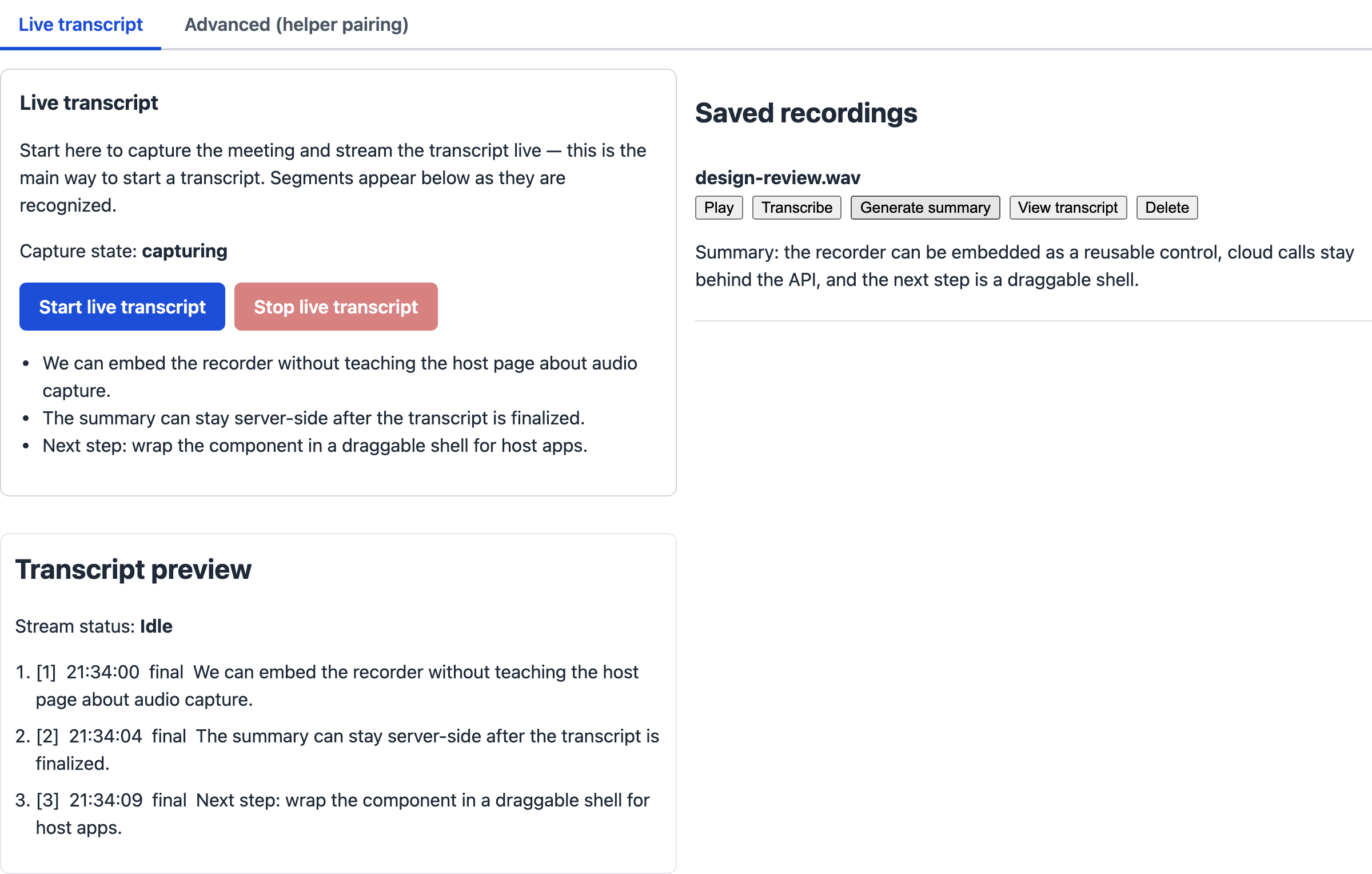
The summary state is the payoff for keeping cloud work behind the API. The browser sees the result and the control keeps its shape, without receiving a key, a deployment name, or a small cursed scroll of setup instructions.
Complete snippet: Call Azure OpenAI for a meeting summary
The moment it worked#
The satisfying moment was not a confetti screen. It was the control acting like a building block while the backstage stayed busy.
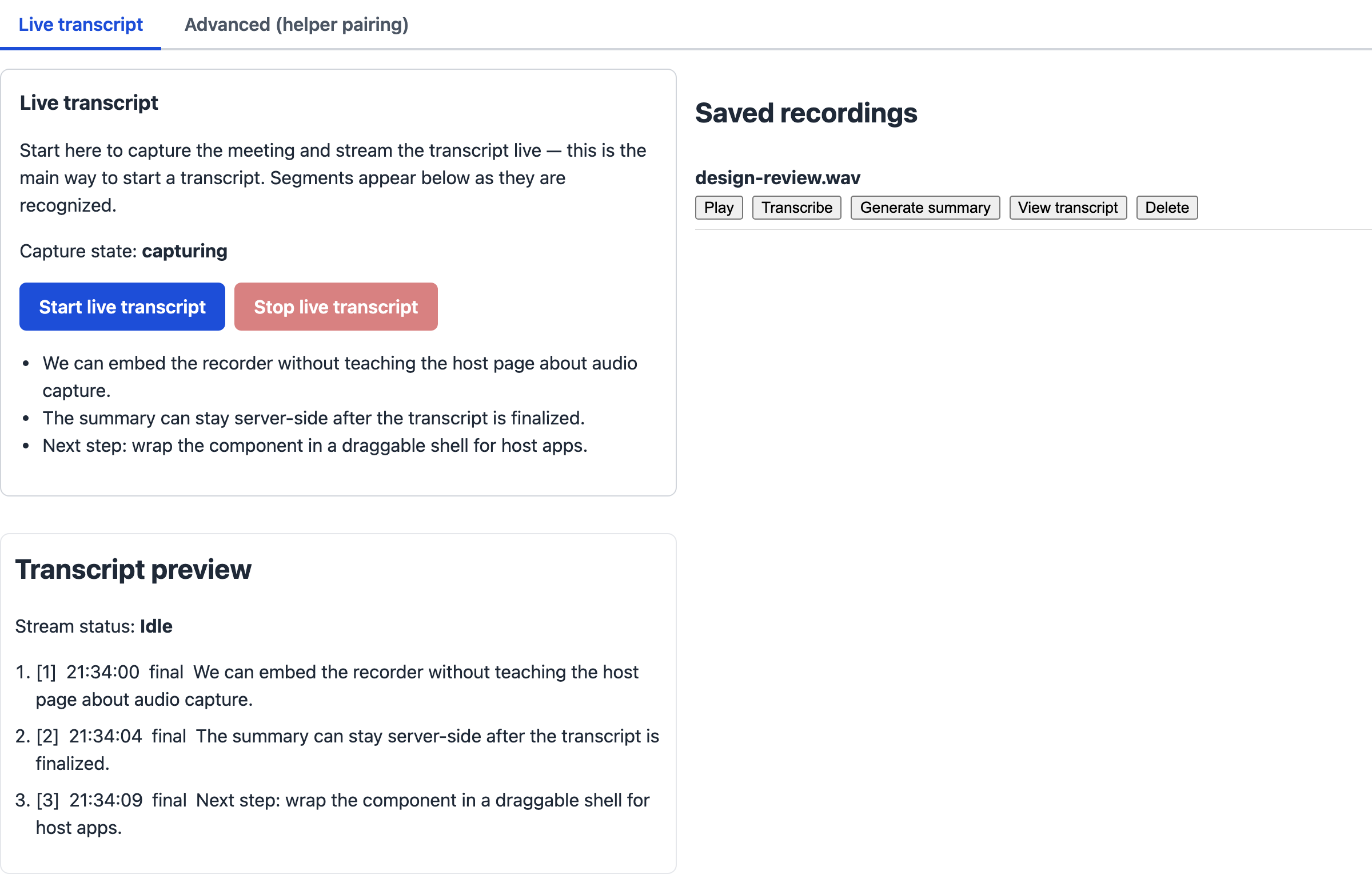
The host page embedded the live transcript control with a meeting ID and a recordings slot. Start caused the API to establish or reuse the helper session and open live recognition. The helper streamed PCM frames. Azure Speech returned recognized text. SignalR pushed transcript events to the component. Stop closed capture, returned a WAV artifact, finalized the transcript, wrote artifacts to storage, and left the summary path on the backend.
This is the picture I wanted before I trusted the design: the host page is still a host page, while the reusable control shows capture state, sample transcript text, and the saved-recordings slot. The machinery is busy, but at least it is busy backstage where it belongs.
The offline checks backed up the scene: the converter compiled and ran against a generated stereo float frame, the loopback helper route compiled and answered health, the WebSocket ingest compiled and handled the bad-request path, and the summary provider compiled and failed the missing-configuration path without making a network call. The sanitization and gitleaks checks were clean.
What I would tell you before you try this#
- Define the component contract before you chase UI polish. The host should pass identity, API location, refresh hooks, and slots; the component should own the capture experience.
- Keep the advanced knobs collapsed by default. Put the everyday path up front, fold pairing and quick capture behind a tab, and open that tab automatically when something fails.
- Keep the helper contract platform-neutral first. The second platform should be a new helper process, not a rewrite of the backend.
- Keep helper endpoints on loopback unless you have a real threat model saying otherwise. Local audio control does not need a public audience.
- Normalize audio before it reaches your recognizer. A boring wire format makes the rest of the system easier to test.
- Persist the recording before streaming errors get a vote. Live text is nice; losing the artifact is not.
- Authenticate WebSocket upgrades before accepting them. The moment after the upgrade is too late to remember authorization.
- Treat partial transcript text as transient unless users have accepted that tradeoff. Final text is the thing worth keeping.
- Store cloud credentials only on the backend. Browsers are excellent at showing people what you shipped.
- Use Blob Storage for recordings, not your database. Databases have enough emotional labor.
- Price Speech and model usage with real meters. Optimism is not a billing model.
- Keep the component honest. If it hides steps, the backend still has to run them.
Put it together#
If you want to build your own version, treat this as the epilogue rather than the whole book. This is not a published repository, an installer, or a full solution dump. The snippets are the reusable pieces.
What you need locally#
- .NET SDK 10
- Node.js 18 or later if you build a React client
- A native helper for your platform
- NAudio 2.2.1 for a Windows helper
- A local SQLite database if you keep the API’s lightweight persistence pattern
The local pieces cost nothing to run, except electricity, patience, and whatever your meeting culture charges for another status update.
What you need in Azure#
Prices below use the Azure Retail Prices API, checked on 2026-10-06 for East US 2. The example assumes 10 one-hour meetings, each with live transcription, optional saved-recording transcription once, and one 8,000 input token plus 1,000 output token summary using gpt-4o-mini.
| Resource | Minimum SKU or meter | Price input | Demo estimate |
|---|---|---|---|
| Azure Speech live captions | S1 Conversation Transcription Audio | $1.20 per audio hour | $12.00 |
| Azure Speech saved replay | Fast Transcription Promo Speech To Text | $0.10 per audio hour | $1.00 |
| Azure OpenAI summaries | gpt-4o-mini global input and output |
$0.00015 input and $0.0006 output per 1,000 tokens | $0.018 |
| Blob Storage recordings | Hot LRS Blob Storage | $0.0184 per GB-month, plus write/read ops | about $0.37 for 20 GB |
| Total | about $13.39 |
There is no fixed monthly compute bill in this local-first version. If you host the API in Azure later, add that hosting cost separately before anyone says the word “production” with confidence.
Wire it up#
- Use Convert capture buffers to 16 kHz PCM inside your helper’s audio tap.
- Use Host a loopback helper API to expose the helper contract only on loopback.
- Use Ingest live audio over WebSocket in the API so the helper can stream PCM frames.
- Use Call Azure OpenAI for a meeting summary after a transcript is finalized.
- Keep credentials in server-side configuration, such as user-secrets for local development or a managed identity plus secure configuration when hosted.
The browser still gets a reusable control. The next app gets the better deal: one embedded building block, fewer secrets, fewer platform assumptions, and fewer reasons to pretend permission prompts are an architecture.
Remember these
From this post
Architecture
Local-first ambient meeting capture
A reusable architecture for capturing meeting audio with a native helper while a .NET API owns recognition, summaries, storage, and browser updates.
Snippet
Ingest live audio over WebSocket
A complete ASP.NET Core endpoint that authenticates a native helper WebSocket before accepting binary PCM frames.
Snippet
Convert capture buffers to 16 kHz PCM
A complete C# audio converter that turns native capture buffers into 16 kHz, mono, signed 16-bit PCM frames for live speech recognition.
Snippet
Host a loopback helper API
A complete ASP.NET Core loopback host and router for a native helper's pairing and capture contract.
Snippet
Call Azure OpenAI for a meeting summary
A complete C# provider that sends a transcript to Azure OpenAI chat completions and returns structured meeting-summary text.