Architecture
Local-first ambient meeting capture
A reusable architecture for capturing meeting audio with a native helper while a .NET API owns recognition, summaries, storage, and browser updates.
AI-generated, human-reviewed: the first draft was generated by an AI agent; I fact-checked, tested, and edited it. AI use policy
Architecture#
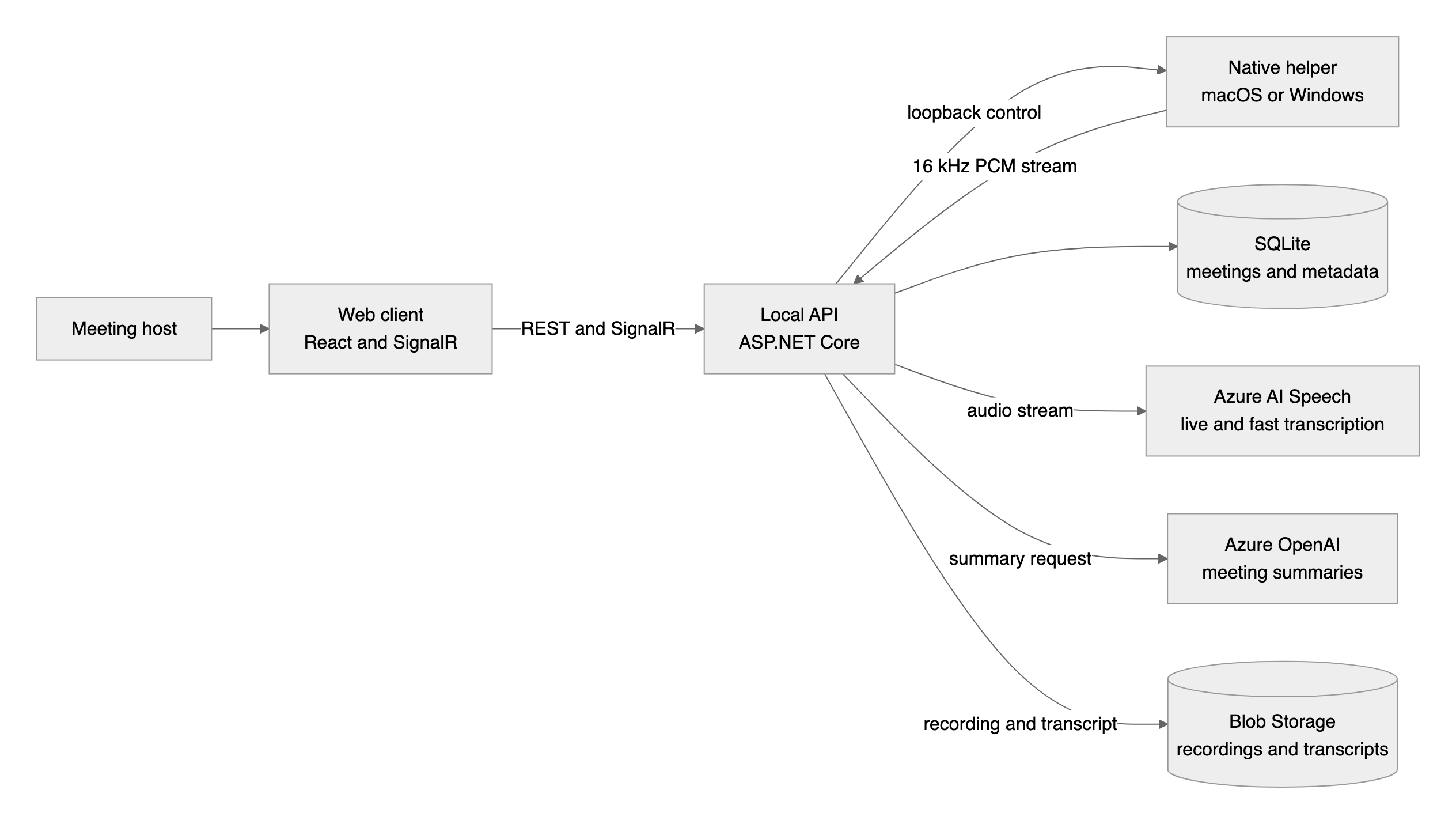
Dataflow#
- The browser creates or opens a meeting and sends Start to the local API.
- The API establishes or reuses a helper session over loopback.
- The helper captures audio locally and streams 16 kHz mono PCM frames to the API.
- The API forwards frames to Azure Speech live recognition.
- Final transcript events are sent to the browser with SignalR and persisted.
- Stop returns a WAV artifact from the helper; the API stores recording and transcript artifacts.
- The API sends finalized transcript text to Azure OpenAI for a structured summary.
Components#
| Component | Role in this architecture |
|---|---|
| Web client | Starts and stops capture and renders live transcript events |
| Local API | Orchestrates helper sessions, recognition, storage, summaries |
| Native helper | Captures platform audio and exposes a loopback-only contract |
| SQLite | Stores meetings, sessions, transcript metadata, and state |
| Azure AI Speech | Performs live recognition and saved-recording transcription |
| Azure OpenAI | Produces meeting summaries from finalized transcript text |
| Blob Storage | Stores recordings and transcript text |
Considerations#
Reliability#
The helper and API are separate processes. The API should detect expired helper sessions and retry the establishment workflow once before surfacing a recovery action. Store the recording before treating live-streaming errors as fatal.
Security#
Bind helper control endpoints to loopback only. Keep Azure Speech and model credentials in backend configuration. The browser should receive transcript events and API responses, not service keys.
Cost optimization#
The local-first version has no fixed Azure compute bill. Speech, model usage, and Blob Storage are consumption meters. For demos, cap meeting length and delete unneeded recordings.
Operational excellence#
Treat audio capture, WebSocket ingest, recognition, persistence, and summary generation as separate units with their own health and error messages. The friendly Start button should not hide failure evidence from operators.
Performance efficiency#
Normalize audio at the helper boundary so the API receives a predictable stream. Send partial transcript events to the browser, but persist final transcript segments.
When to use this architecture#
- You need local audio capture, but cloud transcription and summarization.
- You want a browser experience without browser microphone capture.
- You need the same backend to support more than one native capture helper.
When not to use it#
- A browser microphone prompt is acceptable and captures the audio you need.
- The app must be multi-user cloud-hosted from day one with no local API.
- You cannot install or run a native helper process.
Build it#
The post Ambient meeting capture without handing the browser a microphone walks through the idea, and these complete snippets are the reusable parts: