Tool
The Mac editor I built because I missed Notepad
I missed Windows Notepad on my Mac, so I built a boring Swift editor and learned what plain text, recovery, Unicode, and private restore require.
AI-generated, human-reviewed: the first draft was generated by an AI agent; I fact-checked, tested, and edited it. AI use policy
I missed Notepad.
Not the idea of a text editor. Not a productivity system. Not a notes database with a feelings panel. I missed the Windows Notepad muscle memory on a Mac: open a text file, type, save, use tabs, find something, glance at the status bar, and trust that nothing clever was happening behind the curtain.
The built-in options were almost right, which is its own special kind of inconvenience. One was too capable. One was too opinionated. One wanted me to think about formatting when all I wanted was a plain file and a cursor.
So I built the boring editor I wanted. Then the boring requirements started raising their hands. Plain text needs boundaries. UTF-8 needs honesty. Recovery needs to avoid pretending it is a save. Unicode makes the status bar earn its lunch. Session restore is helpful right up until it becomes a hidden copy of everything I typed.
This is that story: I missed Windows Notepad on the Mac, so I built a small native version and found out what it takes to make boring trustworthy.
At a glance
The text box had to stay boring
Save had to mean save
Recovery copies could not pretend to be saves
The status bar had to count like AppKit
Session restore was not allowed to keep a diary
Why this exists#
Plain-text editors are supposed to disappear. That is the point. The editor should open the file, let me type, save only when I say save, and avoid developing a personality between keystrokes. I wanted that familiar Notepad feeling on a Mac, with enough native behavior to belong there and enough restraint to stay boring.
- The itch: I missed the plain, instant, no-surprises Windows Notepad experience while
working on a Mac: open a
.txtor.mdfile, type, save, use tabs, find text, check the status bar, and move on with my life. - Why I built it: Because I missed it: the familiar Windows Notepad shape on the Mac, without rich text, project folders, hidden document storage, cloud sync, or a tiny IDE quietly asking if I had considered becoming more organized.
- What you get: You get the reusable pieces to build or borrow the pattern: a plain-text editor wrapper, strict UTF-8 file service, local recovery-copy flow, Unicode-safe metrics, and metadata-only session restore. You can avoid accidental formatting, surprise overwrites, and hidden document storage.
- Who this is for: Swift and macOS developers building a small desktop utility, and anyone who has opened a Mac text editor while quietly missing Windows Notepad’s plain, immediate, no-drama behavior.
- Who can skip it: If your editor already needs projects, plugins, syntax trees, and a sidebar civilization, this tiny app is probably too underdressed for the meeting.
The rest of the post turns that itch into five checked, standalone pieces you can inspect without publishing the whole source repository.
The plan#
The bet was plain: make a local, native, tabs-only macOS editor that scratches the Notepad
itch without turning into a platform. SwiftUI would own the window, menus, settings,
prompts, tabs, and status. AppKit would own the text control through NSTextView, because
sometimes the old machinery is old because it earned tenure.
You will want enough Swift to recognize struct, enough macOS to know AppKit did not
retire, and enough text-editing vocabulary to follow NSTextView, UTF-8, and selection
offsets. You do not need NSDocument; the app avoids it on purpose because direct autosave
and versioning conflict with the recovery-copy promise.
Here is what I thought it would look like:
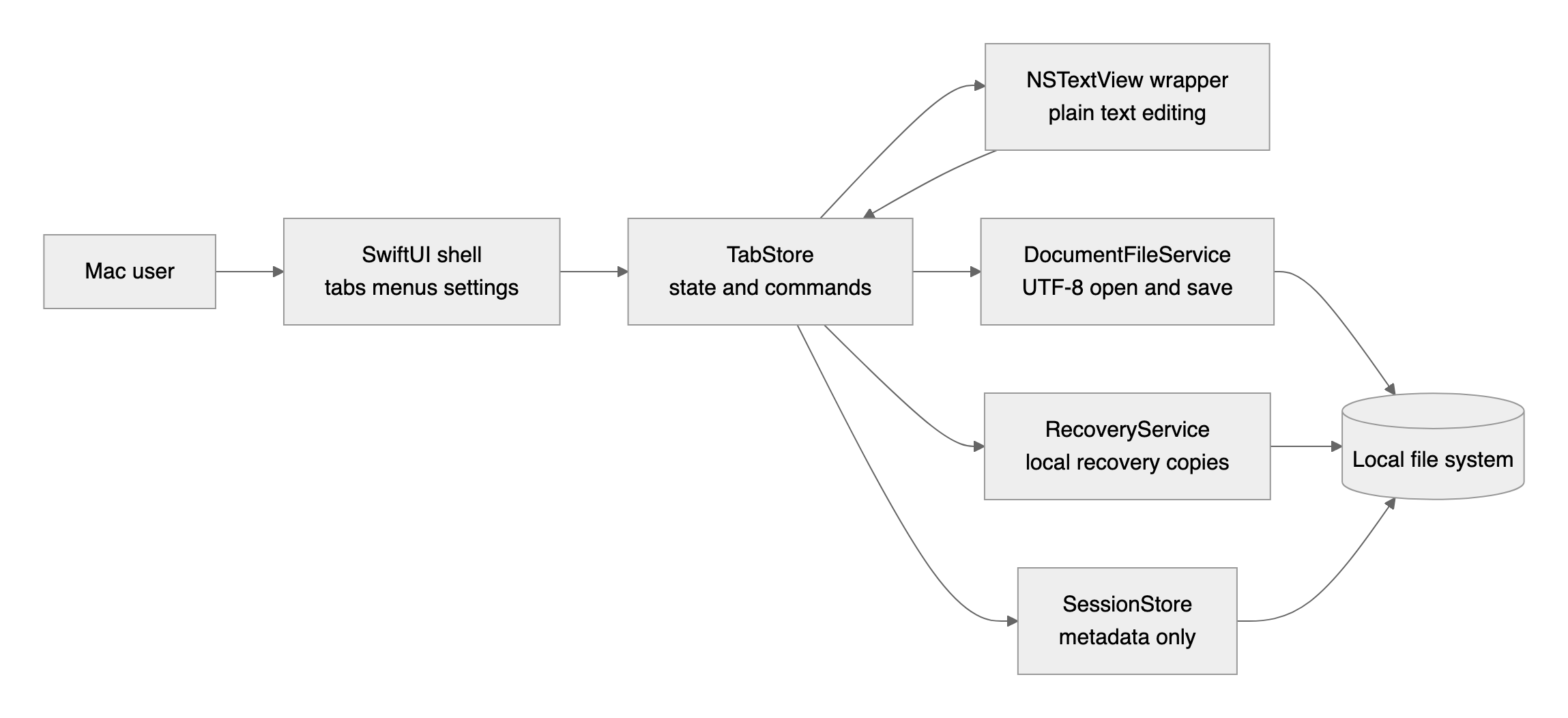
The design rule was simple enough to be dangerous:
- The user decides where recovery copies go.
- Edits can produce local recovery files.
- Real files change only when the user chooses Save or Save As.
- Session metadata remembers tabs, not document text.
That rule pushed the app away from SwiftUI TextEditor, away from NSDocument, away from
Electron, away from cloud sync, and away from any feature that required a billing dashboard
for a text box.
1. The text box had to stay boring#
The first attempt was not to write a text editor from scratch. That way lies syntax trees,
coffee depletion, and possibly a custom scrollbar. I used a SwiftUI wrapper around AppKit’s
NSTextView, then made the wrapper as boring as I could.
The first attempt was not to write a text editor from scratch.
The surprise was how many conveniences a text control can offer when you do not want them. Rich text, graphics import, quote substitution, dash substitution, and automatic text replacement are all friendly in the right app. In a plain-text editor, they are tiny doors out of the product promise.
So the wrapper became a boundary. It reports text and selection changes up to app state. It does not decide what counts as saved, recovered, dirty, or safe.
Complete snippet: Wrap NSTextView for a plain-text SwiftUI editor
The key lines are the product decision in code:
textView.isRichText = false
textView.importsGraphics = false
textView.allowsUndo = true
textView.isAutomaticQuoteSubstitutionEnabled = false
textView.isAutomaticDashSubstitutionEnabled = false
textView.isAutomaticTextReplacementEnabled = false
2. Save had to mean save#
The next boundary was the file service. I wanted .txt and .md support, but only as plain
text. Markdown preview was out. Encoding guessing was out. Heroic huge-file behavior was
also out, because an MVP text editor should not pretend to be a log-analysis platform after
one optimistic Data(contentsOf:).
The next boundary was the file service.
The file service accepts only supported extensions, decodes valid UTF-8, warns above 10 MB, and writes saves atomically. If a file is not valid UTF-8, it fails instead of inventing characters and calling that a favor.
Complete snippet: Open and save UTF-8 plain-text files safely
The important part is less glamorous than it should be:
guard let text = String(data: data, encoding: .utf8) else {
    throw PlainTextFileError.invalidUTF8
}
That small guard keeps the app from silently changing the thing it was asked to protect. The tests back the rule with a 10 MB warning boundary and invalid UTF-8 failure path. Small does not mean “shrug at corruption and hope nobody notices.”
3. Recovery copies could not pretend to be saves#
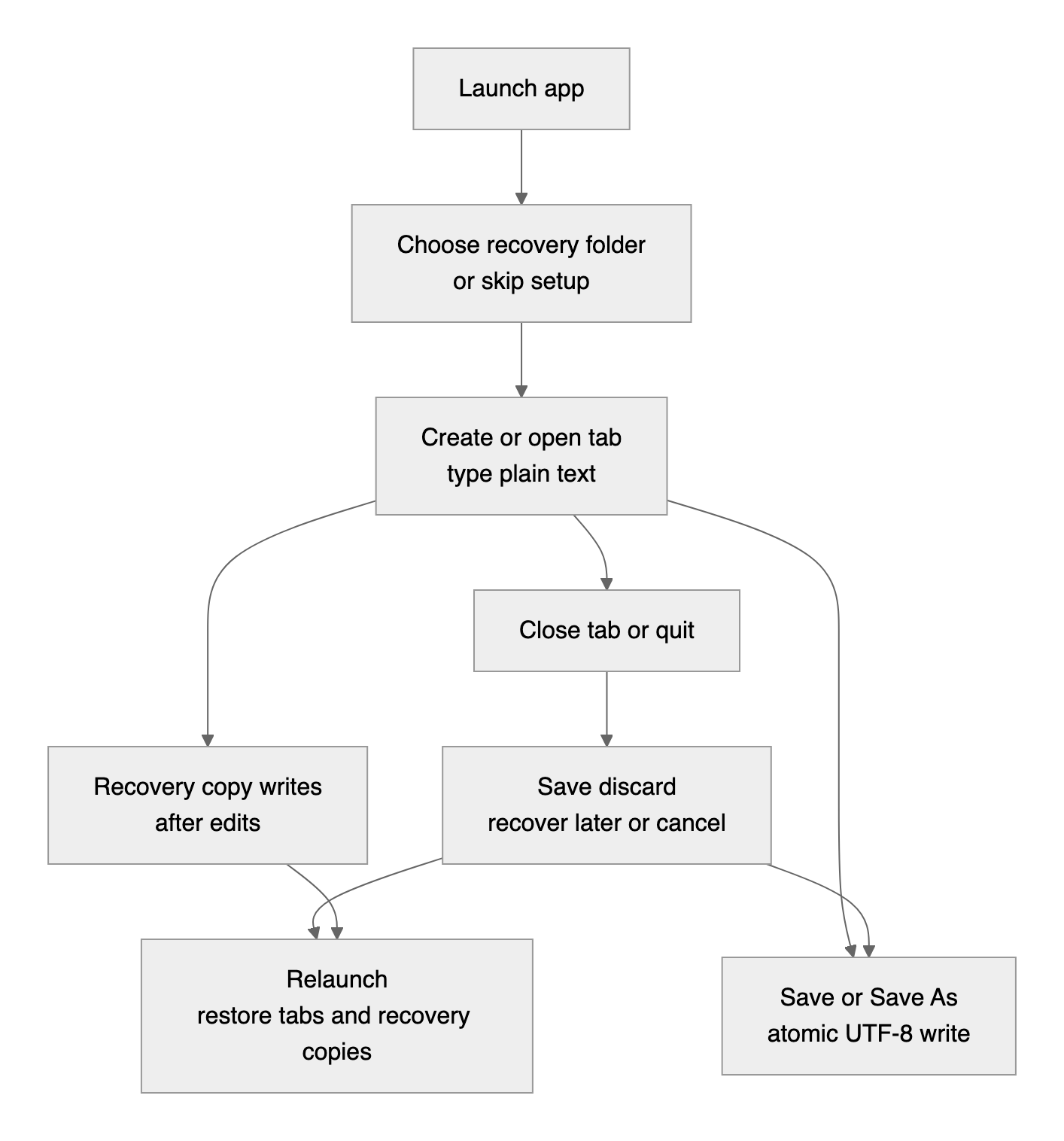
Direct autosave sounds helpful until a scratch note quietly overwrites the file you opened. The product brief made that tradeoff explicit: autosave means local recovery copies in a user-selected folder, not silent writes over the opened document.
Direct autosave sounds helpful until a scratch note quietly overwrites the file you opened.
The recovery promise becomes real when the app has to say the quiet part out loud. Closing a dirty window is not a magic trick; it is a choice, with the awkward honesty plain text deserves.
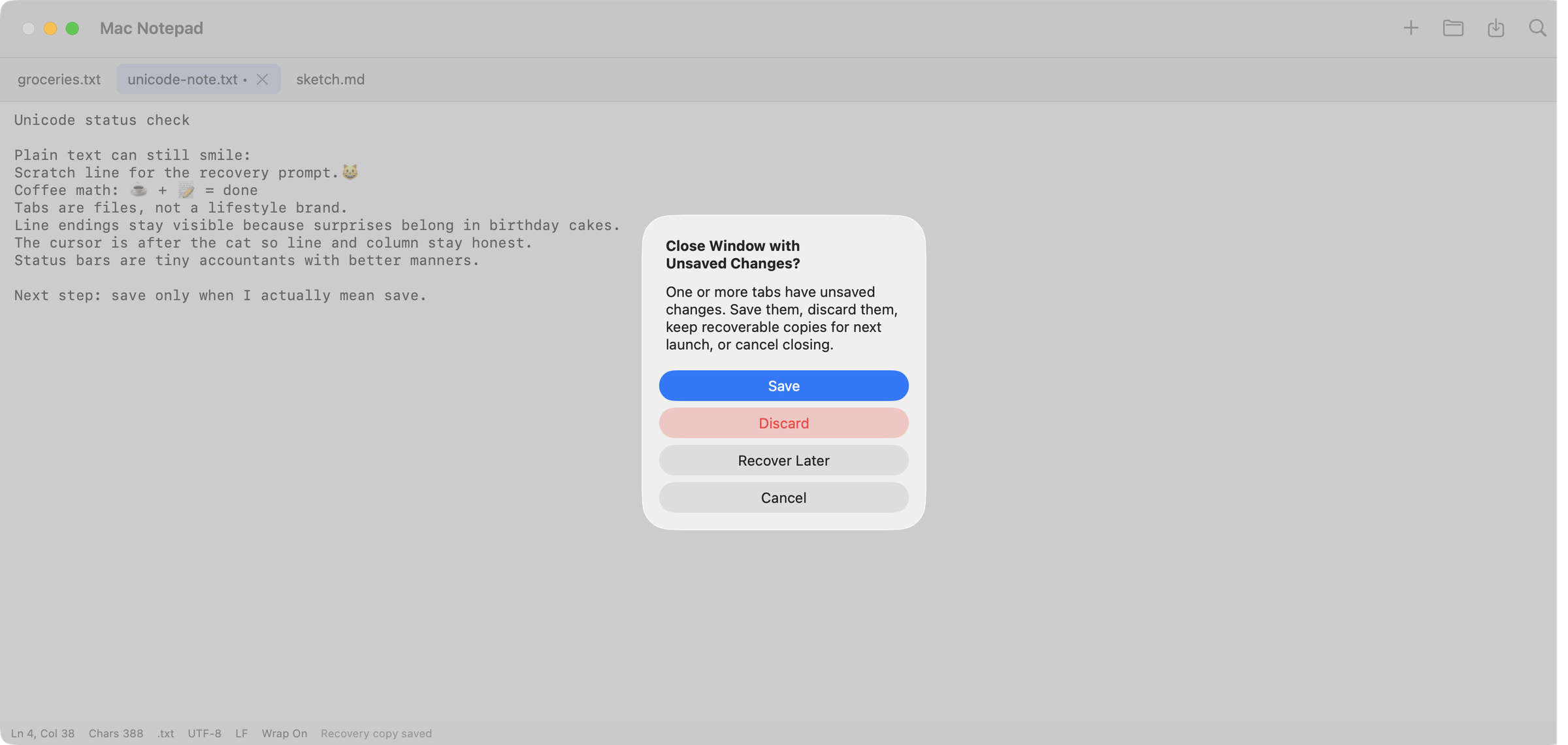
The first-run flow asks for a recovery folder and lets the user skip. If recovery is not set up, editing still works, but the status says so. That matters. A missing safety net is not a secret feature.
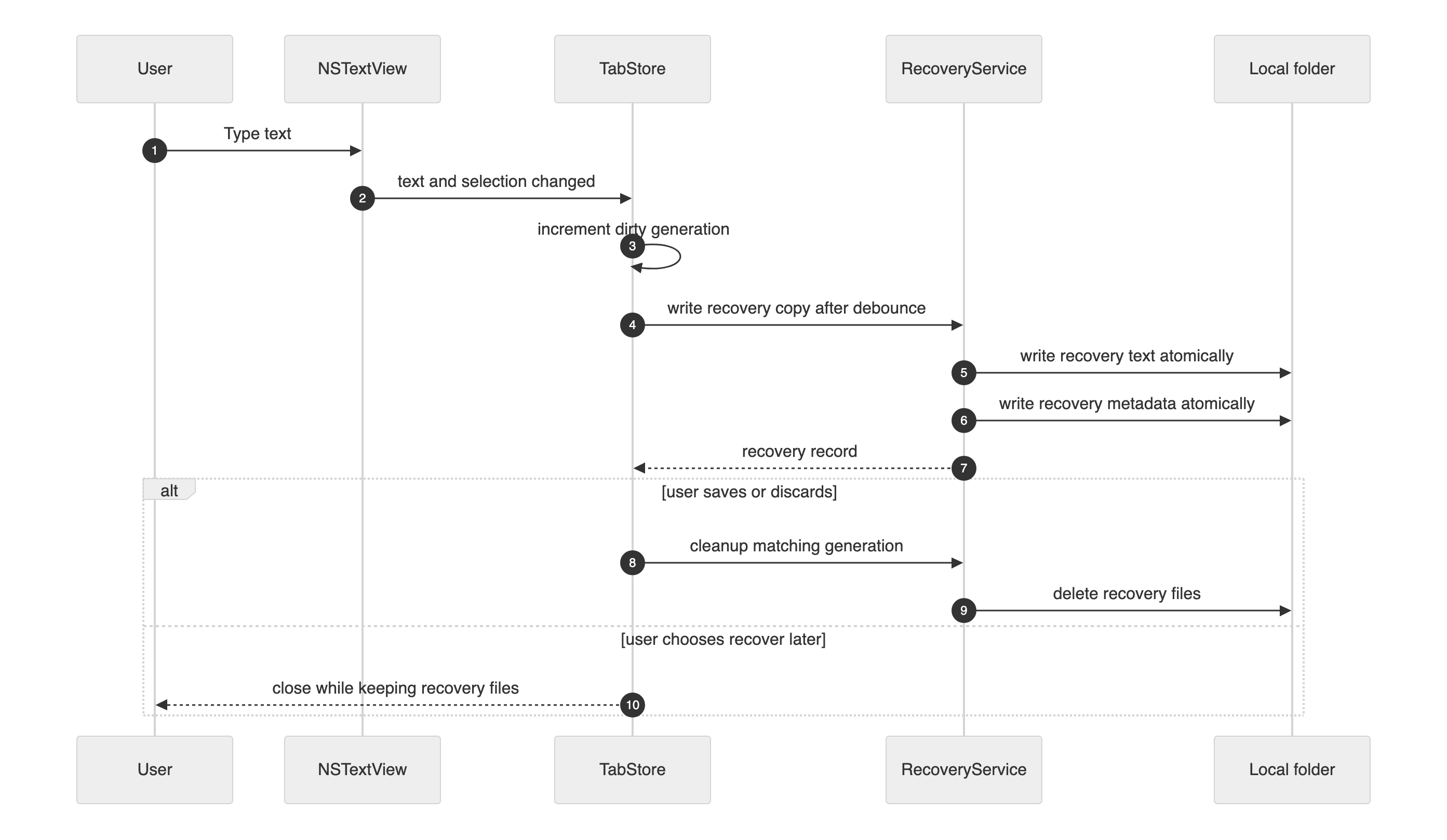
The recovery service writes two local files atomically: the recovery text and a small metadata record. After a real save or an explicit discard, it cleans up matching recovery files. The sequence looks fancier than the implementation, which is a useful sign.
Complete snippet: Write local recovery copies without autosaving over user files
The piece that keeps delayed recovery writes from going backward is the generation recorded with the recovery copy:
let record = RecoveryRecord(
    id: recordID,
    tabID: tab.id,
    recoveryPath: recoveryURL.path,
    metadataPath: metadataURL.path,
    originalFilePath: tab.originalFileURL?.path,
    generation: tab.dirtyGeneration,
    createdAt: now,
    updatedAt: now
)
4. The status bar had to count like AppKit#
The status bar looked harmless: line, column, character count, newline style, document type, encoding, word-wrap state, and recovery state. Then the tests ran where AppKit’s worldview met Swift’s.
The status bar looked harmless: line, column, character count, newline style, document type, encoding, word wrap state, and recovery state.
Swift String is Unicode-correct. AppKit selection ranges are UTF-16 offsets. Both are
reasonable. Together they make a fine trap. A macOS validation run exposed exactly that kind
of bug: CRLF newline detection did not report what the test expected, mixed newline
detection drifted, and a selection offset after an emoji produced the wrong column.
The fix was to scan newline style over Unicode scalars and treat the incoming selection
location as an AppKit UTF-16 offset before converting it to a Swift String.Index.
Complete snippet: Calculate editor line, column, and newline style safely
The conversion starts by bounding the AppKit UTF-16 offset and moving toward a valid Swift index:
let boundedOffset = max(0, min(selectionLocation, text.utf16.count))
var utf16Index = text.utf16.index(text.utf16.startIndex, offsetBy: boundedOffset)
var prefixEnd = String.Index(utf16Index, within: text)
The check still uses EditorTextMetricsCalculator.metrics(text: "hi\n\u{1F44B} world", selectionLocation: 5) and expects line 2, column 2. If it does not, the emoji found your
bug. This is annoying, but cheaper than letting users find it for you.
5. Session restore was not allowed to keep a diary#
Session restore is useful. Session files full of document text are less charming. The threat model called out document contents, recovery copies, and session metadata as different assets, so the session store had to remember enough to reopen the workspace without becoming secret document storage.
Session restore is useful.
It stores titles, file paths, dirty flags, selection positions, and recovery record IDs. It
does not encode the document body. It also ignores legacy text values on decode, because a
privacy fix should not depend on everyone deleting yesterday’s file.
Complete snippet: Persist tab sessions without storing document text
The part that matters is blunt:
var copy = tab
copy.transientText = ""
If a saved file exists, reload it. If an unsaved tab has a recovery record, recover it from the recovery flow. If there is no content source, say so. Metadata is not a backup just because JSON was nearby and looked lonely.
The moment it worked#
At some point, the architecture diagram had to stop waving its arms and become a window. This is the boring version of success: three sample tabs, plain text, an emoji in the buffer, and a status bar doing math without making a scene.
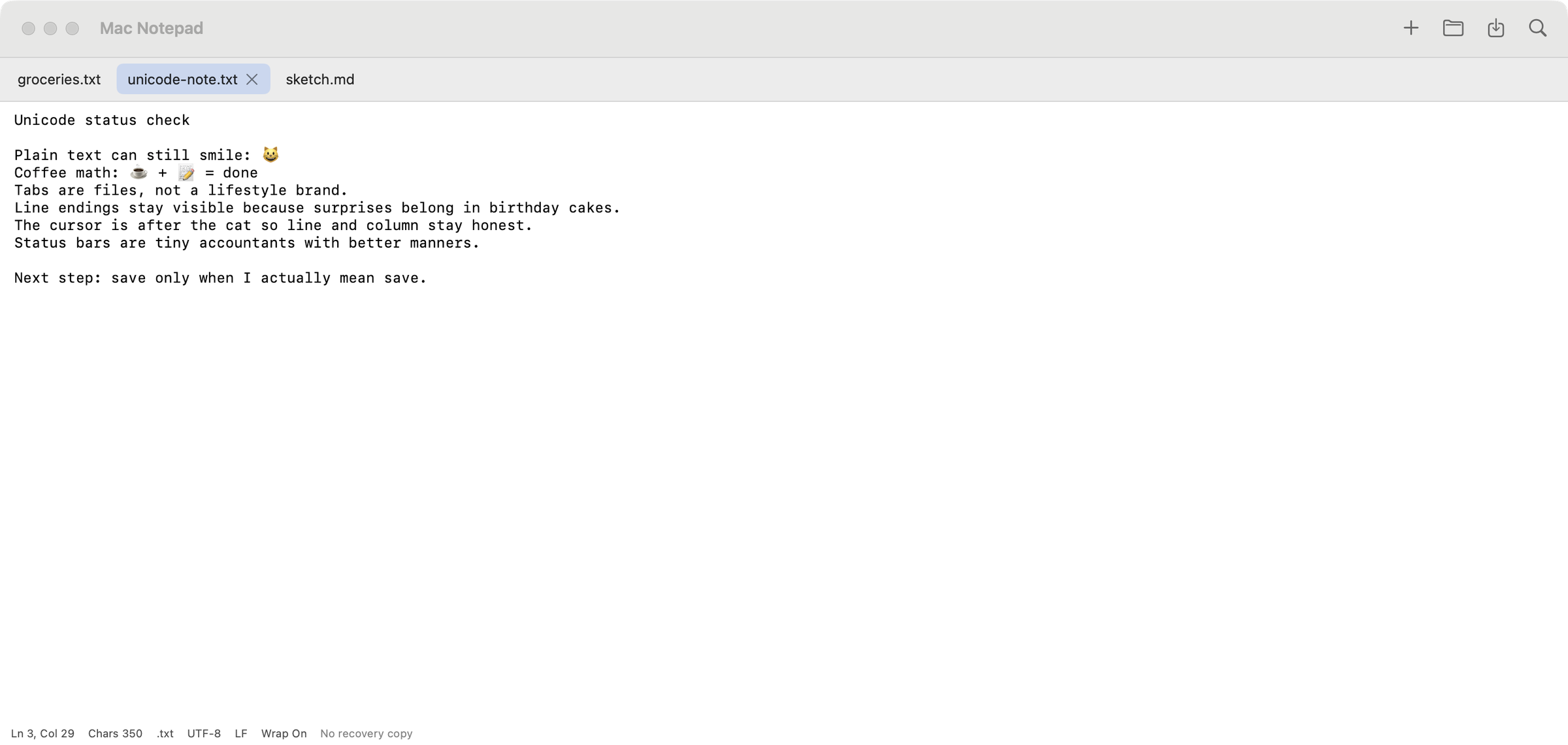
The satisfying moment was not a dramatic UI flourish. It was opening, typing, saving, closing, and reopening without the app trying to become something larger than the thing I missed.
The macOS workflow had already caught the sort of problems a Linux-only check could not:
Swift concurrency around the app delegate, Unicode and newline bugs in tests, and native
build behavior. After the remediations, the exact remediation commit passed the macOS
validation workflow. Static validation passed. swift test passed. swift build passed.
The standalone publication snippets were checked separately for this post:
| Snippet | Check performed | Result |
|---|---|---|
| Plain-text editor wrapper | swiftc -typecheck |
Pass |
| UTF-8 file service | Swift harness opened UTF-8, saved .md, and rejected invalid UTF-8 |
Pass |
| Recovery-copy service | Swift harness wrote recovery text, metadata, loaded both, and cleaned them up | Pass |
| Unicode editor metrics | Swift harness checked CRLF, mixed newlines, UTF-16 offsets, count, and size warning | Pass |
| Private session store | Swift harness verified JSON omits text, decode clears text, and empty sessions heal | Pass |
That is the kind of victory this editor deserved: no confetti, no new account, no telemetry panel, just a plain text box on a Mac acting enough like the Notepad I missed that I could stop thinking about the editor and get back to the note.
What I would tell you before you try this#
- Use
NSTextViewwhen you need real text-editor control. SwiftUI can host it without owning every decision. - Turn off rich text, graphics imports, and smart substitutions on purpose. Defaults are not a product strategy.
- Treat invalid UTF-8 as an error unless the user chooses conversion. Silent conversion is a bug with a friendly hat.
- Warn on huge files before pretending your MVP is a log-analysis platform. The app warns above 10 MB and stays honest about scope.
- Separate recovery copies from explicit saves. Users should know when the original file changes.
- Store recovery files in a folder the user can see and change. Local safety should not feel like a hidden side channel.
- Track dirty generations so delayed recovery writes cannot go backward. Time travel is more fun in fiction.
- Convert AppKit UTF-16 selection offsets before slicing Swift strings. Emoji will audit you for free.
- Persist session metadata, not document bodies. Recovery is the content path; metadata is only a map.
- Keep the tool local until a real user need justifies adding a network. Privacy is easiest before the first endpoint appears.
Put it together#
If you want to build your own version, start with the pieces in the order the app needs them: editor control, file I/O, recovery, metrics, then session restore. This is a local desktop app. It needs no Azure resources, no database, no storage account, no Key Vault, and no cloud telemetry.
The estimated monthly cost to run it locally is $0.00, checked on 2026-10-06. Your Mac’s electricity bill remains outside this architecture, because some boundaries must be respected.
| Cost item | Minimum SKU or resource | Estimated monthly cost |
|---|---|---|
| Azure resources | None | $0.00 |
| Database | None | $0.00 |
| Cloud storage | None | $0.00 |
| Telemetry or analytics | None | $0.00 |
| Local recovery folder | User-selected folder | $0.00 |
| macOS development machine | Existing Mac | Not estimated |
What you need locally#
| Tool or runtime | Minimum version or setting |
|---|---|
| macOS | macOS 15 or later for the app target |
| Xcode | Xcode 27 for the validation environment used here |
| Swift | Swift 6.4 for the snippets checked here |
| Frameworks | SwiftUI, AppKit, Foundation, UniformTypeIdentifiers |
| Network | None required |
| Accounts | None required |
Build the idea#
- Start with the plain-text editor wrapper inside a SwiftUI macOS window.
- Use the UTF-8 file service for open and save.
- Add the recovery-copy service and call it from a debounced edit path.
- Show status information with the Unicode-safe metrics utility.
- Persist tab metadata with the private session store, and keep text out of it.
The useful thing I learned was not how to make a text editor exciting. It was how many small decisions it takes to recreate the Windows Notepad feeling on a Mac without breaking the reason I missed it in the first place.
That is enough for this itch. The text box may now return to being a text box.
Remember these
From this post
Snippet
Wrap NSTextView for a plain-text SwiftUI editor
A complete SwiftUI wrapper around AppKit NSTextView with plain-text enforcement, word wrap, selection callbacks, and first-responder focus.
Snippet
Persist tab sessions without storing document text
A complete Swift session store that remembers tab metadata and selected tab while keeping document contents out of the session file.
Snippet
Write local recovery copies without autosaving over user files
A complete Swift recovery-copy service that writes atomic text and metadata files into a user-selected folder and cleans them up after save or discard.
Snippet
Calculate editor line, column, and newline style safely
A complete Swift utility for UTF-16 editor offsets, Unicode-aware character counts, newline detection, and large-file warning policy.
Snippet
Open and save UTF-8 plain-text files safely
A complete Swift file service for .txt and .md documents with strict UTF-8 decoding, atomic saves, and a 10 MB warning.