Tool
The planning workbook that stopped forgetting last month
A generic Azure consumption planning story about separating private scope from the engine, reconciling shared subscriptions, and rolling decisions forward.
AI-generated, human-reviewed: the first draft was generated by an AI agent; I fact-checked, tested, and edited it. AI use policy
The workbook looked innocent until the next planning cycle arrived.
There it was again: live Azure consumption in one place, app-level splits in another, and last month’s human judgment hiding in cells that were technically editable and emotionally load-bearing. The script could rebuild the numbers. The workbook could preserve the conversation. They were not always on speaking terms.
That is the kind of problem that sounds too small to deserve automation until you have to do it twice. Then it becomes a ritual, and rituals with spreadsheets tend to acquire candles.
I wanted the machine to handle the boring parts and leave the judgment where people already reviewed it: in the workbook.
At a glance
The config had to be boring
The collector needed patience
The shared subscription could not become mystery meat
The workbook had to remember by month, not by column
Why this exists#
Some planning tools fail because nobody can agree on the math. This one exists because the math was not the hard part; the hard part was getting a workbook people could review next month without spelunking through last month’s handmade edits. Azure consumption planning already has enough moving pieces, so asking a spreadsheet to remember everything by vibes seemed rude.
- The itch: Azure consumption planning often needs live Cost Management actuals, app-level splits for shared subscriptions, and analyst overrides in one workbook. Doing that by hand turns every month into a small archaeology project.
- Why I built it: To fix a generic work problem: I needed a reusable way to generate a planning workbook from configuration, keep private scope data out of the engine, reconcile shared-subscription splits, and roll forecast choices forward.
- What you get: A pattern for building a generic planning workbook generator that discovers scope, collects actuals, preserves reviewed decisions, and writes a versioned output without baking private identifiers into automation.
- Who this is for: Azure platform, FinOps, engineering, or planning folks who have to turn subscription consumption into something humans can review without turning the script into a scrapbook of one-off names.
- Who can skip it: If your forecast already fits in one clean export and nobody edits it, protect that unicorn and go enjoy the quiet.
The pattern turned into four pieces: config, collection, splits, and roll-forward behavior. The useful part is not the workbook itself. It is the boundary between what the engine may rebuild and what the humans already decided.
The plan#
The bet was plain: the engine should be generic, and everything that could identify a real planning scope should live outside it. A filled-in config can hold tenant scope, management-group scope, subscription labels, app names, lead fields, and resource-group matching rules. The reusable engine should not.
You will want basic Azure Cost Management familiarity, PowerShell comfort, and Azure read access if you build a live version. The examples here use synthetic placeholders only; no real planning data, scope identifiers, figures, host names, or ownership fields belong in a public post.
Here is what I thought the shape should look like.
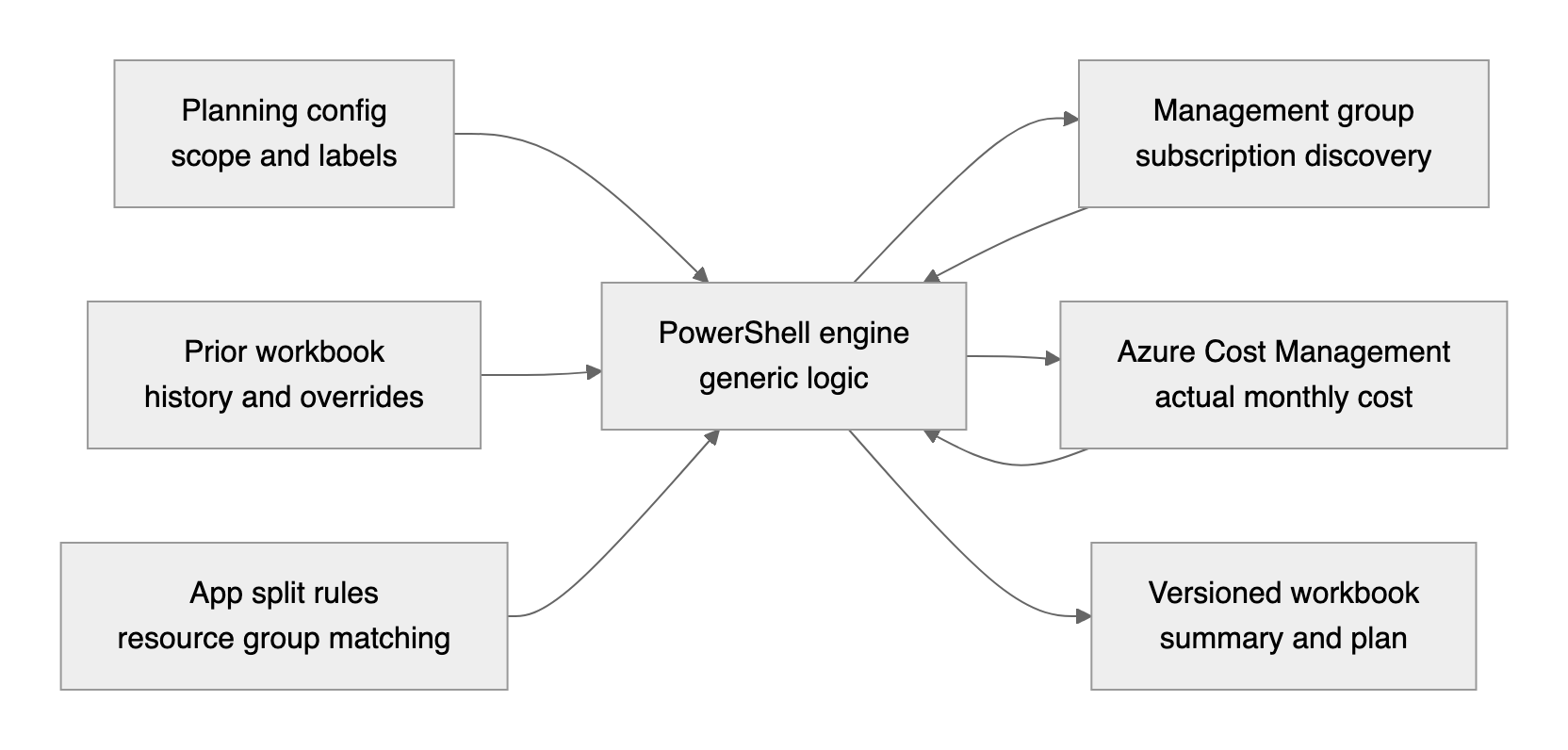
The source implementation follows that shape. It discovers subscriptions beneath a management group, calls Azure Cost Management for monthly actuals, optionally splits shared subscriptions by resource group, reads the newest prior workbook, and writes a timestamped workbook. The visible sheets are Read Me, Summary, Plan, By App, App Splits, Subscription Metadata, Management Groups, and Metadata, with a hidden PartialData sheet for formulas.
That is still a spreadsheet. It is just one with fewer opportunities to develop folklore.
1. The config had to be boring#
The first version of the idea was not “make a smarter spreadsheet.” It was “stop editing the engine whenever the planning scope changes.” The source repository’s template made that boundary explicit: tenant, management group, output folder, version prefix, start month, optional sign-in account, seed metadata, and optional subscription split rules all sit in JSON.
The first version of the idea was not "make a smarter spreadsheet." It was "stop editing the engine whenever the planning scope changes." The source repository's template made that boundary explicit: tenant, management group, output folder, version prefix, start month, optional sign in account, seed metadata, and optional subscription split rules all sit in JSON.
The important decision was to make the config useful but disposable. It can seed the first run, but after a workbook exists, analyst-reviewed fields can roll forward from the workbook because the workbook is where the review actually happens.
The public snippet keeps the same shape without publishing anything private.
$configuration = [ordered]@{
    TenantId          = '<tenant-id>'
    ManagementGroupId = '<management-group-id>'
    OutputFolder      = '<output-folder>'
    VersionPrefix     = 'Azure-Consumption-Planning'
    StartMonth        = '2026-01'
    SeedMetadata      = [ordered]@{
        '<subscription-id-1>' = [ordered]@{
            N = 'Platform Services'
            A = 'Core Platform'
            L = '<owner-name>'
            E = 'Prod'
        }
    }
}
Complete snippet: Create a planning config template
The config seeds the first run. The engine stays reusable. That division sounds dull, which is how configuration should sound when it is behaving.
2. The collector needed patience#
Once the config existed, the next question was where the subscription list came from. Hardcoding every subscription would have worked for about one afternoon. The source tool instead walks the management-group descendants, discovers subscriptions, and queries Cost Management per subscription.
Once the config existed, the next question was where the subscription list came from.
That decision came with a small reality check. Cost Management can throttle, and a planning run may last long enough that tokens need refresh behavior. The source implementation wraps Azure REST calls with retry handling for 429 and 503 responses, honors Cost Management retry headers, refreshes on 401, and fails loudly on 400 or 403 instead of pretending the plan is fine.
The public snippet reduces that to the reusable control flow: one operation, one retry wrapper, and no heroic optimism.
for ($attempt = 1; $attempt -le ($MaxRetries + 1); $attempt++) {
    $result = & $Operation

    if ($result.Success) {
        return $result.Value
    }

    $isRetryable = $result.StatusCode -in 429, 503
    if (-not $isRetryable -or $attempt -gt $MaxRetries) {
        throw "Planning operation failed with status $($result.StatusCode): $($result.Message)"
    }
}
Complete snippet: Retry a rate-limited planning operation
The collector’s job is not to be clever. It is to be predictable, polite to the API, and honest when it cannot get the data.
3. The shared subscription could not become mystery meat#
The awkward part of subscription-level planning is that subscriptions are not always shaped like apps. One subscription can hold several apps isolated by resource group. Showing that as one row may be accurate, but it is not reviewable in the way planners usually need.
The awkward part of subscription level planning is that subscriptions are not always shaped like apps.
The source tool handles that by letting a subscription split into app rows. It queries resource-group costs only for subscriptions that need splits, matches resource groups to slices with wildcard rules, and adds a remainder row for everything unmatched.
The remainder is the control. Without it, split logic can quietly invent or lose money, which is not a charming spreadsheet quirk.
The split view is the anti-mystery-meat table. The parent row shows the whole shared platform, each slice gets its own app row, and the remainder row catches what the rules did not match.

$remainderCost = [decimal]$total - $assignedTotal
$resolved.Add([pscustomobject]@{
    Subscription = $subscription
    Month        = $month
    App          = $rule.RemainderApp
    Slice        = 'remainder'
    Cost         = $remainderCost
})
Complete snippet: Split synthetic subscription cost by resource group
That one guardrail changes the review conversation. Instead of asking whether the shared subscription is “probably close,” you can ask which slice needs a better matching rule.
4. The workbook had to remember by month, not by column#
The last piece was the one that made the workbook feel less disposable. A full rebuild is useful when the shape changes, but most planning cycles need a roll-forward. Finalized actual months should stay fixed. The current month can refresh. Forecast months can move. Analyst overrides should survive.
The last piece was the one that made the workbook feel less disposable.
The trap is tying those choices to column letters. A workbook column is presentation. A month key is identity.
The source implementation reads the base workbook, classifies month columns by header, preserves finalized history, and stores forecast percentages by yyyy-MM. It also reads the editable App Splits sheet when it exists, so split definitions can become a workbook-owned decision after the first seed.
The public snippet shows the same idea without Excel:
if ($FinalizedMonths -contains $month -and $prior) {
    $merged.Add([pscustomobject]@{
        ScopeKey = $scopeKey
        Month    = $month
        Kind     = 'finalized'
        Amount   = $prior.Amount
        ForecastPercent = $prior.ForecastPercent
    })
    continue
}
Complete snippet: Roll a synthetic plan forward
This is the point where the script stops being a report generator and starts acting like a planning assistant. A very quiet one, which is the preferred kind.
The moment it worked#
The proof was not dramatic. No screen flashed green. No one shouted azure-consumptionoss a room. The synthetic checks did something better: they were boring in exactly the right way.
The config snippet wrote JSON and parsed it back. The split snippet reconciled app rows plus remainder to the original subscription total. The roll-forward snippet preserved a synthetic analyst override while refreshing moving actuals. The retry snippet took a synthetic rate limit, waited, and returned the cost row on the next attempt.
That is what I wanted from the full tool: read scope, collect actuals, respect splits, carry forward decisions, and write the next workbook for review.
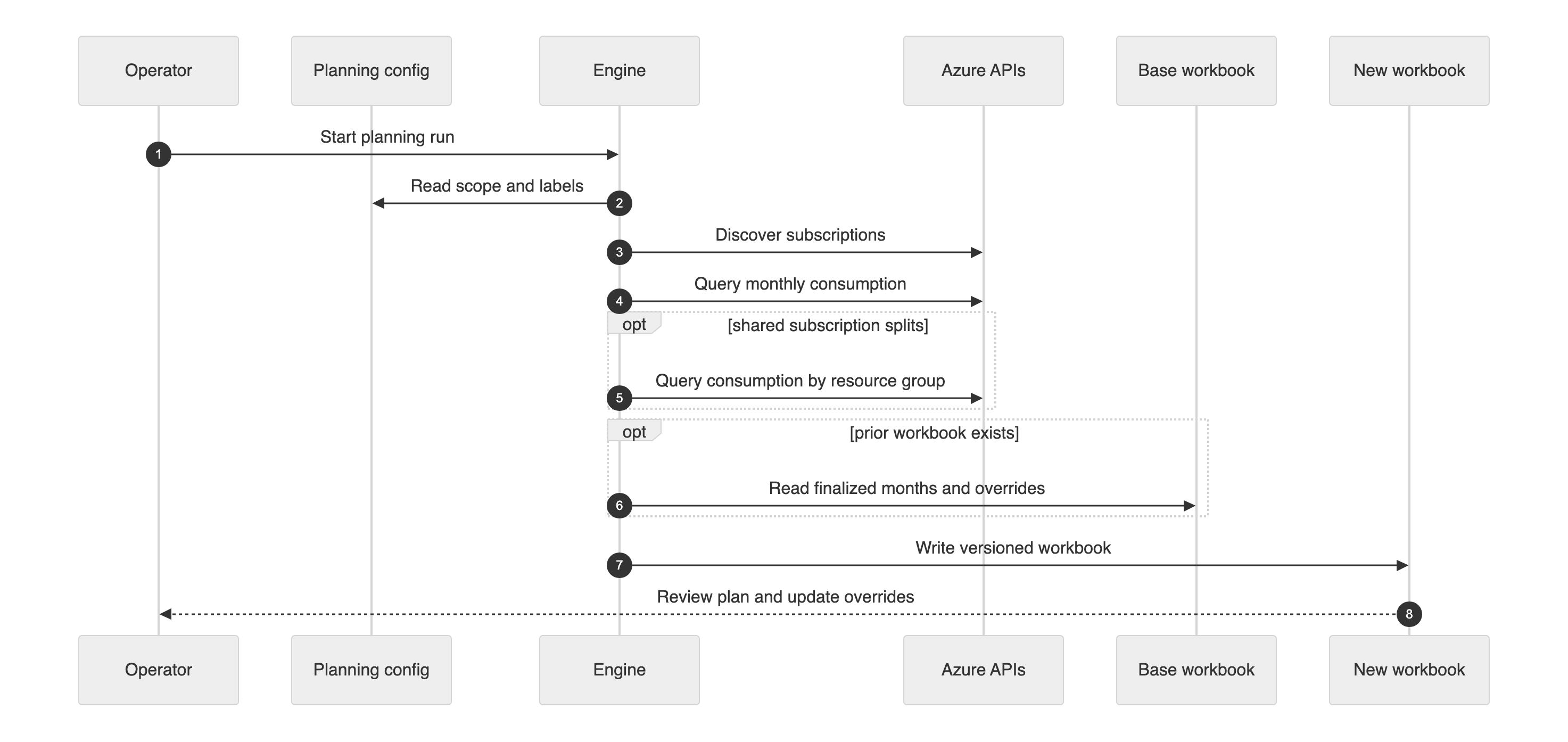
The sequence is not fancy. It is a monthly chore with fewer loose ends.
What I would tell you before you try this#
- Keep real tenant, subscription, and team metadata out of the repository. The engine can be public in shape while the config stays private.
- Make configuration boring enough that nobody needs to edit the engine. Boring config is cheaper than clever branching.
- Discover subscriptions from the management group every run. The subscription list is not a museum exhibit.
- Query resource-group detail only for subscriptions that need app splits. More detail is not better when it mostly burns time and quota.
- Always add a remainder row for unmatched shared-subscription cost. Reconciliation is the difference between a split and a guess.
- Preserve forecast overrides by month key, not by Excel column letter. Columns move; months remain themselves.
- Fail loudly when required configuration is missing. A blank plan that looks successful is worse than a noisy failure.
- Honor Cost Management retry hints and slow down after throttling. The API is already telling you how to behave.
- Version every workbook output. “Final final” is not a versioning scheme, no matter how confidently it is typed.
Put it together#
No repository is published with this post. The snippets are complete, tested against synthetic local data, and meant to show the reusable mechanics without shipping anyone’s planning process or data.
What you need#
- PowerShell 7.6.2 or newer for the snippets in this post.
- For a real Azure implementation,
Az.Accounts5.5.0 or newer to authenticate and request Azure Resource Manager tokens. - For a real workbook implementation,
ImportExcel7.8.10 or Microsoft Excel automation on Windows, depending on how you choose to write the workbook. - Azure read permissions for the subscriptions you want to include, and permission to read the management-group hierarchy.
- Access to Azure Cost Management data for those subscriptions.
The snippets themselves create no Azure resources and call no Azure APIs. They cost nothing to run beyond whatever you already pay for your workstation and your ability to tolerate PowerShell syntax.
Minimum resources and cost#
| Piece | Minimum needed | Monthly cost in this post |
|---|---|---|
| Snippet checks | Local PowerShell | $0.00 |
| Synthetic examples | Local files only | $0.00 |
| Live Azure implementation | Existing Azure subscriptions and read permissions | No new Azure resources |
| Workbook output | Local or approved storage chosen by the implementer | Not created by snippets |
Build steps#
- Create a project config from the planning config snippet.
- Add resource-group split rules with the split-resource-groups snippet.
- Roll forward actuals and forecast overrides with the roll-forward-plan snippet.
- Wrap live collection calls with the rate-limit retry snippet.
- Generate a versioned workbook and keep the filled-in config outside source control.
The finished pattern gives you a generic engine, private configuration, app-level split reconciliation, and roll-forward behavior that preserves decisions humans already made. Less drama, more repeatability is a terrible slogan, but it is a useful way to keep a planning workbook from becoming folklore.
Remember these
From this post
Snippet
Create a planning config template
A complete PowerShell script that writes a sanitized JSON planning config with placeholder scope, labels, and app split rules.
Snippet
Retry a rate-limited planning operation
A complete PowerShell script that retries a synthetic operation when it returns retry-after guidance.
Snippet
Roll a synthetic plan forward
A complete PowerShell script that merges prior finalized actuals, refreshed actuals, and forecast percentages by month key.
Snippet
Split synthetic subscription cost by resource group
A complete PowerShell script that matches synthetic resource-group cost rows to app slices and reconciles the remainder.